Saturday, 9 May 2020

Big fat update (FNA3D, UWP, new functionality)

A new version of XAGE has been released on itch.io to alpha users (keys are still available to anyone who wants one):

  • Automatic UWP project generation (i.e. you can now have your games target Xbox One & Windows Store).
  • A new backend renderer: FNA3D.  The version currently used is still limited to OpenGL renderer but new ones - e.g. Directx11 and Vulkan - are on the way, which is an exciting development as it will further help future-proof the platform, as well as bring performance improvements.  To help with this (and free up some disk space on my poor laptop), I've set up some automated builds of the UWP dlls, via Github Actions.
  • Recent engine changes around gamepad support, viewports & cameras etc, as well as various bugfixes.

All template games have been updated accordingly.  At some point documentation will need a lot of focus, but in the meantime let me know of anything that needs attention.  I've added a project on github to track all items considered necessary for a public release.

Sunday, 26 April 2020

Viewports & Cameras

AGS v3.5 brought some new functionality, including dedicated mechanisms for handling Viewports and Cameras.  Put simply, this allows you to control which parts of the room to display on the screen, and allows you to do things like split-screens and simple zooms, and stuff like this:


Implementing this took longer than I thought, as I had to rework XAGE's rendering flow several times to get it right.  There's a slight overhead as we're now performing two rendering passes - one to project the game onto a room-sized rendertarget, and another to project the cameras onto the viewports on the final rendertarget, which gets displayed on the screen.  Having said that, Last & Furious still only consumes under 5% GPU on my old HD4400, so the overhead is minimal.

Next up is working on a port of Rellax which, among other things, will help me finish up some of the missing GUI controls like Sliders and Listboxes.


Monday, 20 April 2020

Official Console Support

While the port of Last 'n Furious from AGS had been completed last August, it was a good candidate for getting the first XAGE game out Xbox One.  It needed a bit of work, but not much:

  • Controller support had to be exposed to the game scripts and incorporated into the menus and car handling.  This turned out to be pretty straightforward as the decision was made to simply expose the GamePadState via the scripting interface, as well as a new OnButtonPress event for convenience.
  • Basic Xbox Live functionality (sign in) had to be incorporated in order to pass certification.  This turned out to be slightly fiddly, but from a developer point of view is pretty simple to incorporate into a game.  Under the hood, XAGE has a new basic PlatformService interface that - in theory - can be injected with various common services (e.g. Xbox Live, SteamWorks).  This may be padded out in future to support other common functionality like presence, achievements, leaderboards etc. in a general way, so as not to overly complicate the core game script.

With these changes in place, Last 'n Furious was approved for release on Xbox One (as well as the Windows 10 Store):  https://www.microsoft.com/en-gb/p/last-n-furious/9p3c8dq7qfsh


While the desktop platforms support one-click publish, the UWP equivalent is a bit more involved (Microsoft makes you jump through a few hoops - creating developer accounts, Xbox Live sandboxes etc).  It is all documented on their own site, but I'll work on putting the hooks in place so that XAGE does as much of this for you as it can.  Once this process has been trialled on some of the other ported games, I'll push out an update to XAGE Editor for alpha users.

Friday, 10 April 2020

Space Pool Alpha

Another AGS port has been completed - this time Steve McCrea's Space Pool Alpha, which isn't an adventure game at all but rather a vector-based pool game with spaceships.


The XAGE CoreRT build can be played on itch.io.  The source code is available on github (with thanks to Steve).  An update has been pushed for XAGE alpha users so they can clone/download within XAGE itself, and tinker with it that way. 

Like Last & Furious, this was again a more technical port, where the challenge was getting the DynamicSprite and DrawingSurface performance up to an acceptable level.  The results are similar - lower CPU usage than the AGS version, and higher GPU to reflect the work being offloaded onto the graphics card.

I especially like these sorts of ports - smaller and not narrative driven - as I can iterate quickly and they allow me to tackle some of the more complicated items on the outstanding list. 

Tuesday, 10 March 2020

CoreRT and MessagePack - Real World Example

While the benchmarks I recently posted showed a lot of promise for combining MessagePack C# with CoreRT, I wanted to run it with a real world example to confirm that this is worth the effort, so this evening I updated Last 'n Furious, now available on itch.io.

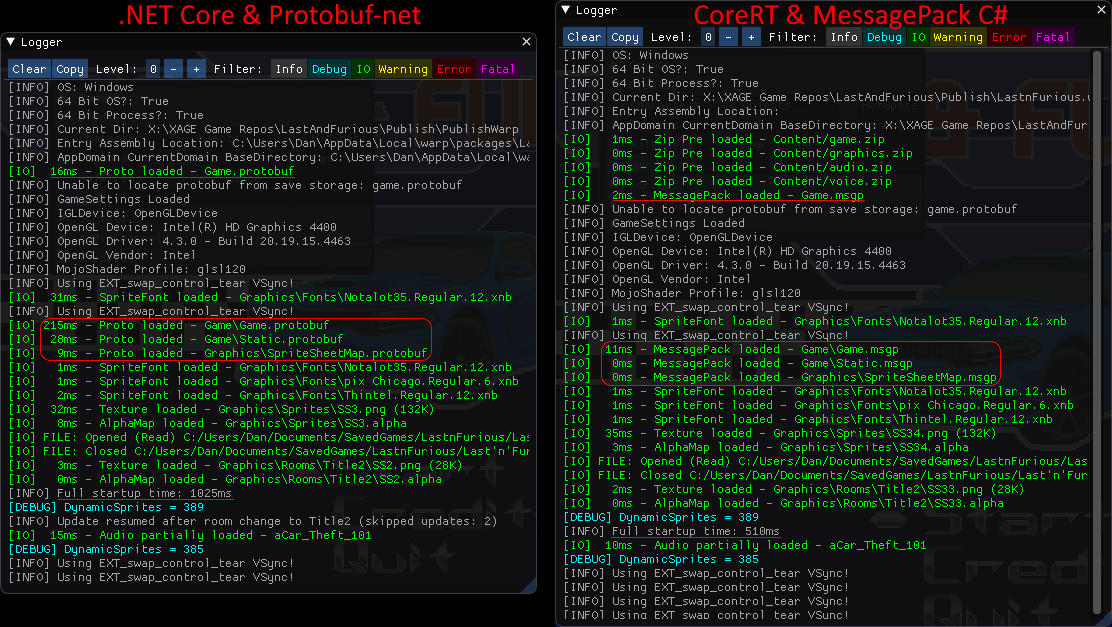
The original version was 97MB, which zipped down to 41MB.  The second iteration - using ReadyToRun, PublishTrimmed and Warp as detailed here - came to 32MB.  The new CoreRT version is 45MB which zips down to just 16MB, so we have halved the size.

Where previously I'd been happy to get in-game in about a second, the CoreRT version now shows the main menu screen in half that time.  It feels snappy like a native executable.  The improvements can be clearly seen side-by-side:


As always, there's more work to be done to integrate MessagePack fully into XAGE's pipeline, but the results already justify the effort involved.

Saturday, 7 March 2020

Experimenting with MessagePack

Serialization keeps me up at night.

For many genres, saving the game state may be as simple as recording what the current level is, along with a score.  For others, like RPGs and Adventure Games, things get a lot more complicated when you're having to save the state of every item in the game at any given point.

There are many serialization mechanisms available to choose from.  For XAGE, the needs are:

  • Performance - the faster the better.
  • File size - too large a payload can typically affect performance, especially when disk IO is a bottleneck.
  • Ease of use - from both an engine and game perspective, the user should be free to think about serialization as little as possible.  So no contracts or schemas, ideally no per-field attributes, and built-in version tolerence.
  • Platform support - must work on all platform, including those with restrictions on JIT.

Early versions of XAGE used XML for the game state (and still do within the editor tools, as it is version-control friendly) but evolved to use Protobuf-net, a C# library that allows you to perform contractless serialization in Google's binary format.  This improved performance and file size significantly, but had one major drawback - lack of AOT support, required by some platforms like iOS and UWP.

Protobuf-net initially had AOT support by pre-generating a serialisation library, but official support for this was dropped.  The author has been waiting for Roslyn Generators in order to embed the serialization algorithms in at compile time.  Unfortunately this has not yet materialised and remains on the future roadmap.

Other serialization libraries exist with AOT support like Ceras, but without version tolerence, so have not been considered.

One I've had my eye on for a while is MessagePack for C#, which has long promised fast serialization times and low payload sizes with LZ4 compression.  Recently their AOT solution - a seperate executable called mpc.exe to generate the serialization logic as C# code - has become available as an MSBuild task, essentially allowing you to automate this process.

MessagePack's benchmarks always looked promising, but it's always important to test using your own data structure - in my case XAGE's main GameContent class.  For this I used BenchmarkDotNet which has become the industry standard for getting consistent and meaningful .NET benchmarks.  With this I was able to get results comparing the standard XML Serializer, Protobuf-net and various flavours of MessagePack (all using string keys rather than integer keys, for version tolerence):

  • LZ4:  Where the payload is compressed using this performant compression library.
  • MPC:  Where the serialization logic is generated by mpc.exe at build time, rather than determined and emitted at runtime.
  • CoreRT:  Using the CoreRT AOT runtime, instead of .NET Core 3.1 (where use of mpc.exe is required)

However it wasn't all plain sailing as:
  1. I couldn't use the BenchmarkDotNet nuget package as the latest SimpleJob overloads weren't in place, allowing you to combine a ColdStart test with the CoreRT runtime.
  2. I couldn't use the MessagePack nuget package for the CoreRT tests due to some emit issues that are outstanding.  Compiling from scratch using some conditional symbols (NET_STANDARD_2_0; UNITY_2018_3_OR_NEWER; ENABLE_IL2CPP) resolved this.
  3. All my classes had to be decorated with MessagePack attributes, and all public properties not needed with [IgnoreMember].
  4. Protobuf-net's surrogate mechanism (for types like XNA's Vector2 and Color classes) is not supported and had to be reworked to be more generic in order to support MessagePack.
Once these issues were resolved, I was able to test with the largest GameContent data I had, and the results were surprising:


Note that these are 'Cold Start' benchmarks - i.e. single iteration tests with no warmup, repeated many times over.

Here the benefit of pre-generating the serialization logic is clear to see (MPC), but the performance of the CoreRT incarnations blew the rest away.  What took XMLSerializer 1247ms and Protobuf 848ms took MessagePack just 36ms from cold.  Adding LZ4 compression to reduce the filesize to 255K only brought this up to 40ms.  I dumped the GameContent as JSON in the benchmark cleanup methods to confirm the data was actually being loaded and saved correctly, as I didn't believe the results at first.

While it would take some time to fully integrate MessagePack into XAGE, it currently appears to be the best option in the absence of protobuf AOT support.  I just hope that .NET 5's AOT strategy works as well as CoreRT.

Tuesday, 5 November 2019

Putting lipstick on Sisyphus

Development has been somewhat chaotic lately.  Instead of focusing on one or two particular areas, I've been hammering away at my TODO list - all the little bugs and enhancements and quality-of-life improvements needed to get XAGE in a shippable state.  I'm regularly pushing out new builds of the tools to itch.io to get into good habits as part of an established release process.

Having said that, a number of recent changes have a common theme, which is either to reduce the CPU usage (particularly startup time) or reduce the disk/memory requirements.  Often these optimisations work against each other, so it has taken some experimentation to determine which combinations achieve the best balance.

  • The custom BitArray ("BooleanMatrix", for fast alpha detection on textures) was changed to use a RoaringBitset implementation.  This massively reduces the amount of storage space needed, both file and memory, at a slight performance cost at runtime.
  • The pipeline was changed so that the PNG spritesheets are published as LZ4 compressed 32-bit bitmaps.  While testing with Cart Life I'd noticed some frame drops while loading in a 4K spritesheet mid-game.  The LZ4 compression has an extremely fast decompression rate, and having the raw bitmap data removes the need to decode from the original PNG in-engine.  This loads in textures much more quickly at a cost of moderately increased file sizes.
  • Profiling indicated that FAudio, the audio engine used by FNA, was slow to initialise.  By warming this up on program entry on a throwaway thread, we're able to shave a second or so from the initial startup time.
  • The GameSettings file is now stored as protobuf file, removing a minor XML deserialization performance overhead (a few 100ms).  
  • Using the 'PublishTrimmed' option on the game project has the linker remove unused code, which reduces the final package size.
  • Using the 'PublishReadyToRun' option - a sort of mini AOT solution - reduces the start up time, at the cost of increasing the final package size.
  • Warp was used to produce the final package (as the 'PublishSingleFile' option is not mature enough yet).  Packaging it up in this way increases the very first start up time but reduces the final package size and makes it easier to distribute and run.

I've released an updated version of Last 'n Furious with the above improvements.  The result is a single executable that is smaller (32MB) than the previous version (40MB zipped).  After the initial run, the game starts up in about 1 second, which is about as good as it gets until we are AOT-compiling the final executable in .NET 5.

CPU usage is down slightly, hovering around 2-3% CPU mid-race on my old laptop compared to 4-5% on the previous version.  Memory usage is also down to about 180MB compared to 220MB before.

Mac and Linux builds of the game also exist, though are not yet available due to an outstanding texture issue that only seems to affect the Mac platform - this should be resolved once I get my hands on some actual Apple hardware, like one of the ten richest kings in Europe.

Getting there.

Friday, 9 August 2019

Last & Furious

In November 2017, Ivan Mogilko and Jim Reed created Last & Furious for a MAGS competition.  Unusually for AGS, it was a top-down racer in the mould of SuperCars II.  It went on to win a handful of annual AGS awards as it spoke to the versatility of that engine.  

Fortunately, they also shared the source code on github.  A previous attempt at porting it to XAGE hadn't gotten very far, as it relied heavily on functionality I hadn't yet implemented (DynamicSprites, new audio mechanism, scripted keyboard handling etc). 

As work continues on [REDACTED], I periodically return to old ports as a palette-cleanser and also to see how far the conversion tools and engine have progressed.  After a few weeks of late nights (with some additional pointers from Ivan), I'm happy to say the port is complete and now available on itch.io.


Download link:  https://clarvalon.itch.io/lastandfurious  (40MB, Win x64)

This is using the latest version of the XAGE engine, running on a standalone deployment of .NET Core 3.  It is not using a CoreRT build as the .NET foundation have recently decided to instead focus on a different AOT approach for .NET 5 once it launches in 2020.  

Performance seems decent - on my 6 year old laptop it averages at about 5% utilisation for both CPU and GPU while in the middle of a race.  By comparison, the AGS version averages about 20% for CPU.  This is likely because it is using a software renderer whereas XAGE is able to offload more work onto the GPU.  I also optimised a handful of things along the way, so not exactly a fair comparison.  Where AGS still trumps XAGE comprehensively is memory usage.

The conversion process was 95% automated.  The C# generated should look very familiar to anyone comfortable with AGS Script:


There were a few manual tweaks to:
  • Correct some AGS variable type inconsistencies (as with every port).
  • Simplify some of the walkable areas, here used determine obstacles and how the car controls on various surfaces.
  • Suppress pathfinding (as everything is handled manually).
  • Change the scope of a handful of arrays to reduce the amount of garbage being generated (the game still generates a lot, but mainly Gen0, and not enough for it to affect performance).
  • Prevent new DynamicSprites being created for every single rotation - instead let the GPU handle it.
  • Force a custom texture to be stored locally (to speed up GetPixel calls).
I left in the debug hooks so pressing the usual console key (`) will open the ImGui debug console.  It should otherwise look and feel identical to the original AGS version.

As I've been working primarily on something behind the scenes, it's nice to be able to show how general engine development is progressing!

Sunday, 3 March 2019

Experimenting with CoreRT

I hope you like acronyms.

As work on porting [REDACTED] continues, I've been putting more thought into distribution.  Now that XAGE uses .NET Core, we have the option to publish 'standalone' executables, which means there is no requirement to have a version of the .NET framework installed on the end user's machine.  This is a good thing, though results in a version of .NET Core being bundled in with the final executable, which at the moment means lots of individual files and a much larger overall size.

There is a mechanism being developed to allow these individual files to be essentially be bundled together and extracted to a temporary location at runtime, though I'm not convinced that this is the best approach.

A more interesting prospect is leveraging CoreRT in order to compile everything ahead-of-time (AOT) into a native executable.  This comes with some benefits:

  • The final standalone executable is much smaller and completely self-contained.
  • The startup time is much quicker as no just-in-time (JIT) compilation is required.
  • General performance is better.
  • Decompilation of the code is much harder with native executables compared to .NET. 

At the cost of a few downsides:

  • The process of the AOT compilation & linking to remove unused code means that you need to provide some details on items not to remove in the form of an XML file.
  • One of FNA's selling points is that you can package your game with MonoKickstart in such a way that it will work for x86 and x64 Windows, Mac and Linux.  Using CoreRT will mean that separate packages need to be prepared per platform. 

The CoreRT project is still in early preview, but has made a lot of progress in the last few years.  In the process of trying to get it work with XAGE, I came across a major stumbling block:  CoreRT does not currently support XmlSerialization and Protobuf-net - both of which are serialization techniques used by XAGE.  The reason for this is that CoreRT does not support Reflection.Emit, which generates Intermediate Language (IL) which is JITed into native code.

There are some changes on the way that should make both viable with CoreRT, but in the meantime I wanted to explore some different serialization techniques, which is when I discovered Biser.  This little-known library allows you to generate serialization C# classes AOT that you can include in your final executables or libraries, meaning no run-time reflection is required (not dissimilar to something I'd first tried back in 2010).  I was able to rewrite this and include it in the XAGE workflow such that it could be used as the single serialization method within the engine runtime:


And voilà, we have our minimum viable game runtime - here for Windows x64:


Where the executable is under 24MB and there are only 11 files in total:

  • Four content files specifically for the XAGE game (game.zip, graphics.zip, audio.zip and voice.zip - the latter two of which are optional)
  • Six native .dlls in the x64 directory - five required for FNA (FnaLibs) and one for Dear ImGui, which you probably wouldn't need as part of the Release build anyway.
  • Strictly speaking I should also include FNA.dll.config, but it seems to work fine without.

I like this a lot, as we get the bleeding edge functionality & performance from .NET Core while also producing neat and tidy native distributables.

I'm not sure whether I'll stick with my fork of Biser (unimaginatively named Xiser) or return to Protobuf-net once it matures further and is able to support CoreRT.  I have a lot more confidence in Marc Gravell's ability to maintain a robust & feature rich serializer than my own.  But it's good to have options.

Tuesday, 1 January 2019

The state of things

Last march I committed to releasing XAGE publicly in 2018.  This hasn't happened, but for a good reason.

For most of 2018 I've been working on a port of an upcoming commercial game, details of which are under NDA.  The game itself represents a scale & complexity I've not worked with previously, and has helped focus attention on the areas that most needed work.  At a high level:

  • Several months were spent improving the AGS code parsing so that the converter could, in this case, automatically produce 36,000 lines of equivalent C#.
  • Time was spent further optimising the Editor and build tools to handle the large volume of game items and assets, in such a way that re-ports can still be iteratively performed quickly.
  • Font handling was rewritten to convert .ttf, .sci and .wfn formats to XNA-style spritefonts.
  • Support for 'new-style' AudioClips & AudioChannels was introduced.  DynamicSprites and DrawingSurfaces were also partially implemented.
  • AGS scripting coverage jumped from 39% to 64% for properties and 50% to 62% for methods.
  • Engine script-threading was re-written to more closely align it with AGS (i.e. Global & Room threads) and with some events being queued rather than run immediately.
  • The AGS Exporter plugin now optionally uses Potrace (for vectorising walkable areas) and ffmpeg (for converting all audio to .ogg).  
  • The runtime now uses the latest version of FNA with FAudio handling the .ogg files.
  • A runtime debug console was added using Dear ImGui & ImGui.Net, with a custom inspector and logger added to help with debugging.

There have been 745 commits to the XAGE source code repository in 2018.  Counting commits is not the best metric, but it is a metric, and hopefully one that gives some indication that this project is very much a going concern.

Seeing the port of [REDACTED] progress from thousands of compile errors to a close facsimile of the AGS version has been very rewarding.  It's not quite there yet - there is still plenty to do - but there have been times recently when debugging where I've forgotten whether I'm playing the AGS or XAGE version of the game.  If the same rate of change can be maintained then with luck you'll be able to play [REDACTED] on Xbox One and other fancy platforms sometime in 2019. 

Wednesday, 14 March 2018

AGS Script to C#

I've never been out on New Year's Eve.  It always seemed noisy and expensive, and I've never been around people who were inclined to celebrate, so it stands to reason that I was working on XAGE on the evening of December 31st, 2017.

I'd posted some progress pics and got chatting to Scavenger, who kindly sent me the source code to his AGS game Terror of the Vampire.  After poking around for a few hours I was able to convert the bulk of the game to XAGE, albeit with a worryingly large 10K+ of C# scripting errors.

At high volume the number becomes somewhat meaningless - a missing bracket can create hundreds of syntax errors in a single class - but it was clear this was a complex game that came with a lot of challenges:

  • Massive AGS Modules like Tween were used which were not being parsed well.
  • AGS Engine plugins were used and unsupported.
  • AGS-style structs were used throughout, which were not being parsed and converted into equivalent C# classes.
  • There were gaps in the scripting API, mainly due to newer AGS functionality as part of version 3.2 - things like AudioClip and AudioChannel.

By looking at the error patterns in Visual Studio, I was able to start whittling the error count down by improving the parsing, handling new data structures, implementing API placeholders and some workarounds for various AGS quirks and oddities (especially around scope).  Two and a half months later and we're down to 81 errors following a fresh conversion.

The law of diminishing returns dictates that trying to automatically resolve these would involve a big time investment that is better spent elsewhere, given they are generally simple to solve by hand, and can often be fixed beforehand in the AGS source.  They mostly revolve around C# being somewhat stricter than AGS code:

  • Casting.  C# doesn't like to implicitly cast certain types, like a bool or char into an integer.  AGS is rather lax about typing.  The solution is to add an explicit cast. 
  • Function integrity.  AGS allows you to define a function with a return type and not actually return anything.  C# does not ("not all code paths return a value").  Solution is to fix the return values.
  • Method variable scope.  AGS allows you to define variables within inner blocks that share the same name as a variable in the outer block.  C# does not.  Solution is to fix the scope or rename the variables.

These are all simple things to fix manually, meaning we are now able to fully compile the C# solution and get in-game:


As can be seen from the screenshots, there is a lot of engine functionality that has yet to be implemented or isn't quite right, but this is where the real work begins.  I will most likely start with DynamicSprite and DrawingSurface as these are all throwing null exceptions currently and are used throughout this game.  This is where I finally start to flesh out the Engine API and turn some of those table cells green.

A big caveat is that AGS Engine plugins still remain unsupported - for the time being I added a few placeholder classes to act as a dummy implementation to allow the code to compile.  It may be that we can autogenerate C# bindings to the original C++ plugin .dll, but the simpler option may be to simply re-implement each required plugin in C# and keep everything in managed code.

Other items

  • I've foolishly committed to releasing XAGE in some form or other this calendar year.
  • There has been some promising experimentation around embedding VS Code directly into XAGE Editor for a more seamless (if diluted) user experience.
  • PUBG is still causing me an enormous amount of pain.

Saturday, 14 October 2017

The Ever-Changing Horizon

As of a few days ago, XAGE runs on .NET core.  What does that mean?  Let's have a quick and probably inaccurate history lesson.

.NET Core

In 2014 Microsoft announced they were open-sourcing .NET.  Their new direction involved splitting the framework, from the old monolithic windows-only .NET Frameworks and introducing the new fancy, cross-platform .NET Core.  While Microsoft committed to updating both, it was clear that they saw .NET Core as the future.

For a while everything was confusing.  The command line tools didn't work very well and were constantly being changed.  Microsoft toyed with using a new project.json file to replace the old xml-based *.csproj files, only to revert back again.  The documentation was initially poor and often out of date with each iteration.

With the release of NET Standard 2.0, things are looking considerably better.  The framework API now covers a much larger set of the existing functionality.  All key platforms can target this standard i.e. Windows, Mac, Linux, iOS & Android (via Xamarin) and UWP.  The tooling is now better, with support built directly into Visual Studio, by far the best IDE for development.

XNA, MonoGame & FNA

In 2006 Microsoft first released XNA, a simple framework built on top of .NET for making games.  The main draw was the ability to write games in C# and to target the Xbox 360 console.

A few years later, an open source implementation of XNA specifically for iOS appeared called XNATouch.  This later became MonoGame as the number of supported platforms grew and more developers became involved.

By 2013 Microsoft finally retired XNA.  The writing had been on the fall for a while, though its abandonment upset a great many hobbyist developers who had invested a lot of time and energy building their games upon it.  MonoGame and FNA stepped up to fill the gap.

FNA was a fork of MonoGame by Ethan Lee, using an SDL2 renderer instead of the unsupported OpenTK as used (then) by MonoGame.  One impressive aspect on FNA was its laser-focus on accuracy, which shows in the quality of the Linux and Mac ports it has produced (e.g. Fez, Roque Legacy).

XAGE

At various points, XAGE has been built upon each of the above, including other implementations not mentioned here (e.g. Silversprite).  At the time of writing, MonoGame is used for its content building tools and handheld platforms.  FNA is used for the main desktop platforms.

With the recent support for .NET Core and potential plans for additional platform support (given the ubiquity of SDL2), the case for using FNA is strengthened further, though MonoGame remains an important and useful project.

Being able to use .NET Core solves distribution problems (no need to install the .NET framework, no complicated or brittle Mono binaries).  It also feels good to be back on the bleeding edge, which is a far cry from all the anxiety around XNA's protracted demise.

There remain some blockers for making the switch fully.  One being that XAGE uses Protobuild for creating all the relevant Visual Studio solutions and projects for the user.  Protobuild does not currently support .NET Core.

Regardless, we're in a pretty good position right now.  The big graphics rewrite started a year ago turned into a larger refactoring project that is resulting in a saner, more manageable codebase.  Once a few more reliability and usability milestones have been hit, we'll be looking to put out a release into the wild.

Wednesday, 15 March 2017

Xbox One Support

Since starting work on the big refactoring piece I haven't paid too much attention to broadening platform support. However, since Microsoft announced the Xbox Live Creators Program (essentially a replacement for the Xbox 360's Xbox Live Indie Games), I was curious to see how much effort it would be to get XAGE up and running on the Universal Windows Platform. It turned out to be this: two evenings, thanks to MonoGame v3.6.  Using the latest version of Protobuild, XAGE Editor will now automatically create a Visual Studio solution for UWP:


Some of the changes to the engine could be done without breaking anything, though some required introducing more preprocessor soup (#if #else #endif) due to breaking framework changes. Ideally once dotnet core matures then we can move towards NETStandard libraries for all platforms.
  • UWP forces all file IO to be asynchronous, so the simplest solution was to use a synchronous wrapper specifically for the WindowsUniversal libraries. 
  • Minor API changes were needed (e.g. replacing Delegate.CreateDelegate with MethodInfo.CreateDelegate, generic use of SystemException with System.Exception).
  • Replace all Stream.Close() with Stream.Dispose() where a using block is not used for automatic cleanup. 
  • Remove all errant use of System.Console.Write() for debugging.
  • Identifying the main UI thread using Task.CurrentId instead of Thread.CurrentThread.ManagedThreadId (access to threads is not exposed in UWP).
  • Inserting GetTypeInfo() into various reflection method calls and properties due to a very UWP specific workaround.
The result of this work is that XAGE now tentatively supports the Windows 10 Store and the Xbox One family of consoles. I've updated the list of supported platforms accordingly.


Not everything is quite implemented yet (serialization, audio etc) but I'll return to finish this up once the main refactoring is complete.

Sunday, 20 November 2016

Interfaces vs Concrete Wrapper Classes

Software development can often be very rewarding, with interesting problems to solve and little pockets of endorphin releases as a reward.  It can also be a pretty tedious drudgery of box ticking with little to no fanfare.  The last few weeks have mostly been the latter.

Previously, when working on game scripts, a developer would be using C# interfaces defined within a standard interface library (XAGE.Interface.dll), which is how the scripts are de-coupled from the engine runtime.  The .NET naming convention for interfaces is to use an 'I' prefix e.g. ICharacter.

However, it's not possible to define a static method or property as part of an interface (which, when you think about it, wouldn't make sense anyway), so these were instead implemented as part of a second class e.g. Character.  This leads to some confusing and inconsistent typing in game scripts, e.g.:

ICharacter myCharacter = Character.GetAtScreenXY(mouse.x, mouse.y);

To work around this, I've created a concrete wrapper class for each interface:

// Instance of interface injected into concrete wrapper class
private ICharacter engineCharacter;

// Properties
public int x
{
    get
    {
        return engineCharacter.x;
    }
    set
    {
        engineCharacter.x = value;
    }
}

// Methods
public void SayAt(int x, int y, int width, string message)
{
    engineCharacter.SayAt(x, y, width, message);
}

Creating these wrapper classes has not been fun, even though it was partially automated, as there were of hundreds and methods and properties to wrap.  It does however have the following benefits:

  • The developer only needs to know about the single concrete class instead of the interface.  The newly styled documentation is also more straightforward as a result.  This will be fleshed out in future with examples and annotations.
  • Any discrepancies between the interface class and AGS scripts can be hidden as part of the wrapper class.  The main one being how AGS primarily uses integer IDs compared to XAGE's string IDs.
  • Automatic AGS conversions now no longer need clumsy string swaps for certain types.

There are some downsides however.  There is a tiny performance overhead in some instances, and some additional complexity when maintaining lists of objects in both the script and the engine.  These are outweighed by the benefits however.

So the last few weeks of spare evenings have been pretty dull, much like this blog post, but it's another small step in the right direction.  Next up:  Re-wiring and profiling.

Monday, 12 September 2016

Still Alive

Whatever tiny web presence XAGE has is usually followed by a comment including the word 'discontinued' or 'abandoned'.  Lack of any new releases and updates on this blog hasn't helped that perception.  In reality development has continued at a fairly steady pace (416 commits since I switched version control to Bitbucket in February 2014).  I've been posting the occasional progress tweet but recent work justifies (and my daughter's now almost sane sleeping habits allow) a new blog post.

Graphics Rewrite

A hangover from the earliest XAGE prototype had become increasingly a problem and the effort required to solve it meant it had been put off not just for months but years.  Originally, XAGE required that SpriteSheets be built by hand.  The earliest engine runtimes contained hardcoded animation frames (X/Y pos, Offset etc) for borrowed Monkey Island 2 graphics.  Later these animation frames were editable via XAGE Editor but were time consuming and fiddly to set up.  The situation was eased when converting AGS games, where SpriteSheets were built automatically at the point of conversion, but there were still problems with the whole process:

  • The placement of the assets on each SpriteSheet was not optimal which resulted in larger Png & .Xnb files.
  • Each object was directly tied to a single specific SpriteSheet, so anything that did not fit onto the specified maximum texture size (e.g. 1024 x 1024) would not be available to that object (you can see the visual glitches this would result in on old TGP videos).  SpriteSheets could be shared between objects but each object would need to have its own set of frames, animations and views etc.
  • Creating a game from scratch would still require manually building a SpriteSheet.

The solution was to move towards an approach much closed to how AGS handles art assets:

  • XAGE Editor will automatically create SpriteSheets on build (rather than during conversion) from the raw image assets.  The bundling of these images can still be dictated by the end user by arranging them in different folders or providing overrides.
  • Objects are no longer tied to a specific pre-built SpriteSheet, but now can use any image or globally shared animation and view.  This should make it much easier to eliminate any outstanding animation glitches found in converted AGS games.
  • SpriteSheets are automatically created under the hood using SpriteSheetPacker which arranges the images in a more optimal way, saving space.  Performance is improved by using FastBitmap and by only rebuilding whatever SpriteSheet has had a raw image asset change (or recreate everything when the per-platform setting has changed i.e. from maximum texture of 1024 x 1024 to 2048 x 2048).
  • Some components that were split out into seperate elements in the XAGE Editor Treeview have now been simplified by using DataGrids, to make it quicker and easier to create animations and views.
  • Managing raw assets now uses Cyotek's ImageBox component, which is far more polished than the clunky old custom viewer.

The take away is that everything is far simpler for the end user.  The rewrite is about 80% complete but the results are already positive.

This also represents a slight change in direction for XAGE.  Previously I'd been reluctant to model both the editor and engine on AGS too closely, which resulted in forcing some square pegs into round holes.  Going forward I'll be reworking any sensible AGS paradigm directly into XAGE as an individual component, rather than forcing them into a component that doesn't quite fit its needs (e.g. AGS Regions and HotSpots into XAGE WalkBoxes and Room Objects).  Anything I'm still not fond of (e.g. Bitmap masks for walkable areas) will not make their way in, but overall the ease and quality of AGS conversions should improve.

The above means ripping out a lot of old code written five or six years ago and replacing it with something a bit more elegant and appropriate.  This should put the entire engine as a whole on better footing for a maintenance perspective.

Other bits & pieces:

  • The 'X' in XAGE no longer stands for XNA but instead 'Cross-Platform'.  This felt like an important distinction as XNA is essentially dead whereas the libraries that XAGE is built upon, MonoGame and FNA, are very much alive.  More importantly, keeping the same acronym meant I didn't have to put any effort into rebranding.
  • A simple static website serves as its new home:  clarvalon.bitbucket.io
  • Bitbucket also hosts a public-facing Issues/Enhancements list and Documentation Wiki.  The latter will be fleshed out once the next alpha release becomes available and focus moves away from plumbing towards implementing more of the scripting hooks within the engine itself.

Sunday, 5 October 2014

Awakener ... again

Several years ago I ported Ben Chandler's Awakener to XAGE.  Although it was fully playable, during development I was increasingly unhappy with what was under the hood.  I've blogged infrequently about the improvements that have been made to the engine since, but here's a concise comparison:
  1. Scripting is now handled in pure C# rather than an XML-based scripting language.  Protobuild is used to synchronise XAGE Editor with automatically created Visual Studio solutions.
  2. On Windows, the dependencies on Microsoft .NET and XNA have been removed by using mono & Ethan Lee's Monogame fork, FNA, along with cygwin & mkbundle to produce a standalone executable.
  3. Pathfinding is much improved with the old walkboxes replaced with floor polygons.
  4. There are now three interchangeable input methods - mouse, controller & touch.
  5. The new SDL2-based backend allows for fully resizable windows and different scaling modes. 
The Awakener UI has also been tweaked to incorporate some lessons learnt with Ortis.  Try for yourself:
I've also uploaded a short youtube video to showcase some of the above features:  http://youtu.be/enFbfhqluJU (ProTip:  Don't record videos at 1AM with a poor quality headset).

Monday, 17 December 2012

Like a Traction Engine

Ortis is currently being developed in two different continents using two different engines.  How does that work?  Like this:

Photobucket

It's a simplification of course - Ben has input on how the different user interfaces should work, and I chip in with some AGS code and the occasional ill-conceived plot device ("What if Madelyn actually suffers from hair loss and can only stimulate her follicles using the milk of human kindness?").

As the lead creative force, it's absolutely fair to say that Ortis is primarily Ben's baby.  One advantage of the approach we're taking is that, in the unfortunate event I'm incapacitated by one of the UK's many bad drivers, he'll be free to continue and complete the game to his own satisfaction within AGS.  Assuming my good fortune continues (thirty years free from being run over and killed), we'll end up with an attractive, interesting and accessible game available on three core platforms, with potentially up to six more should interest be sufficient.

Tuesday, 27 November 2012

Games 'n that

Ortis:

As mentioned on Ben Chandler's blog, we've been collaborating on a new game for some months.  It's being developed primarily in AGS, with a view to releasing an XAGE version of the game on as many platforms as we can.  It's early days yet, but the quality of Ben's initial artwork is very high indeed, and improving with each scene:

Photobucket

Rather than porting it at the end of the development cycle and being overwhelmed with hundreds of bugs, the game is being ported iteratively.  This means I can squash most issues as and when they occur, and being able to play early builds on the Xbox and Windows Phone has been important in making sure the interface is simple and intuitive across all platforms.

It's a massively exciting project to be a part of.  I'll try to blog about this more as things ramp up.

Prime Minister's Questions:

About eighteen months ago, I agreed to attempt a port of Mark Richards' then beta AGS game, Prime Minister's Questions.  It proved to be a good test case for the early C# scripting engine, though a chronic lack of free time and some unfortunate technical issues with third party libraries meant it was only about 90% complete.  Mark released the AGS version shortly after and got some decent coverage within the  mainstream press.

After recently taking another look at latest (and most likely, last) version of Silverlight, I found I was able to finally complete the job.  I'm quite pleased with the results - whilst there are still improvements to be made, general performance is much better than the original port of Awakener back in 2010:

Photobucket

Mark's now working on a new HTML5 & Javascript powered PMQs, so I look forward to seeing a smug, pixelated George Osborne receiving his parliamentary comeuppance.

Wednesday, 15 August 2012

More sweeping changes

These late nights are slowly killing me, but it's worth it - development has been progressing at its fastest rate in months:
  • The scripting engine has been revised for a fourth time, and now operates on C# scripts without the use of yield-powered coroutines.  This is, according to conservative estimates, about a zillion times better.
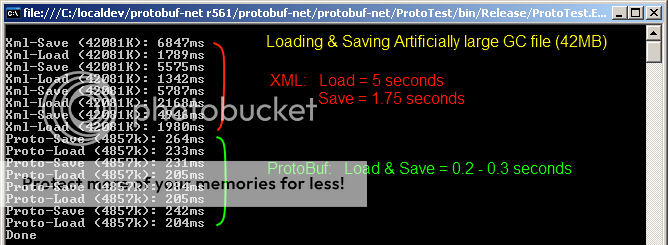
  • Runtime serialization is now powered by Google's Protocol Buffers (protobuf-net) as this works on all platforms and is ridiculously fast compared to XML.
  • Support for spoken dialogue has been added.
Also, many thanks to David Gouveia who very kindly sent me the source to his excellent A* & Clipper powered pathfinding system.  I'm hoping to be able to leverage this into XAGE as a direct replacement for the old, clunky Walkbox system, providing I can crowbar in some additional functionality:
  • Separate walkable polygons (that can be enabled/disabled at runtime).
  • Closest-point identification (when clicking outside of a walkable polygon).
As I'm happier with the current state of the engine than I have been for a long time, I've recently been collaborating on a little something with a gentleman who has been proven to be an impressive 30.4 times better than Ben10.  More on this over the next month or two.

Sunday, 17 June 2012

XAGE on Android

Taken a few minutes ago, here's the very first screengrab of XAGE running on Android (via Monodroid and Monogame).

Photobucket

Unfortunately the Android Emulator is decidedly more clunky than iOS and WP7, so I probably won't pursue this further until I have the appropriate hardware and licenses. At the very least it has satisfied my curiosity over the potential of Android as a platform, if not yet the viability of it in a real-world scenario.